Search Burst

Find answers, guides, features and more.

    Engagement tracking

    Find what’s broken, missing or ignored on your site

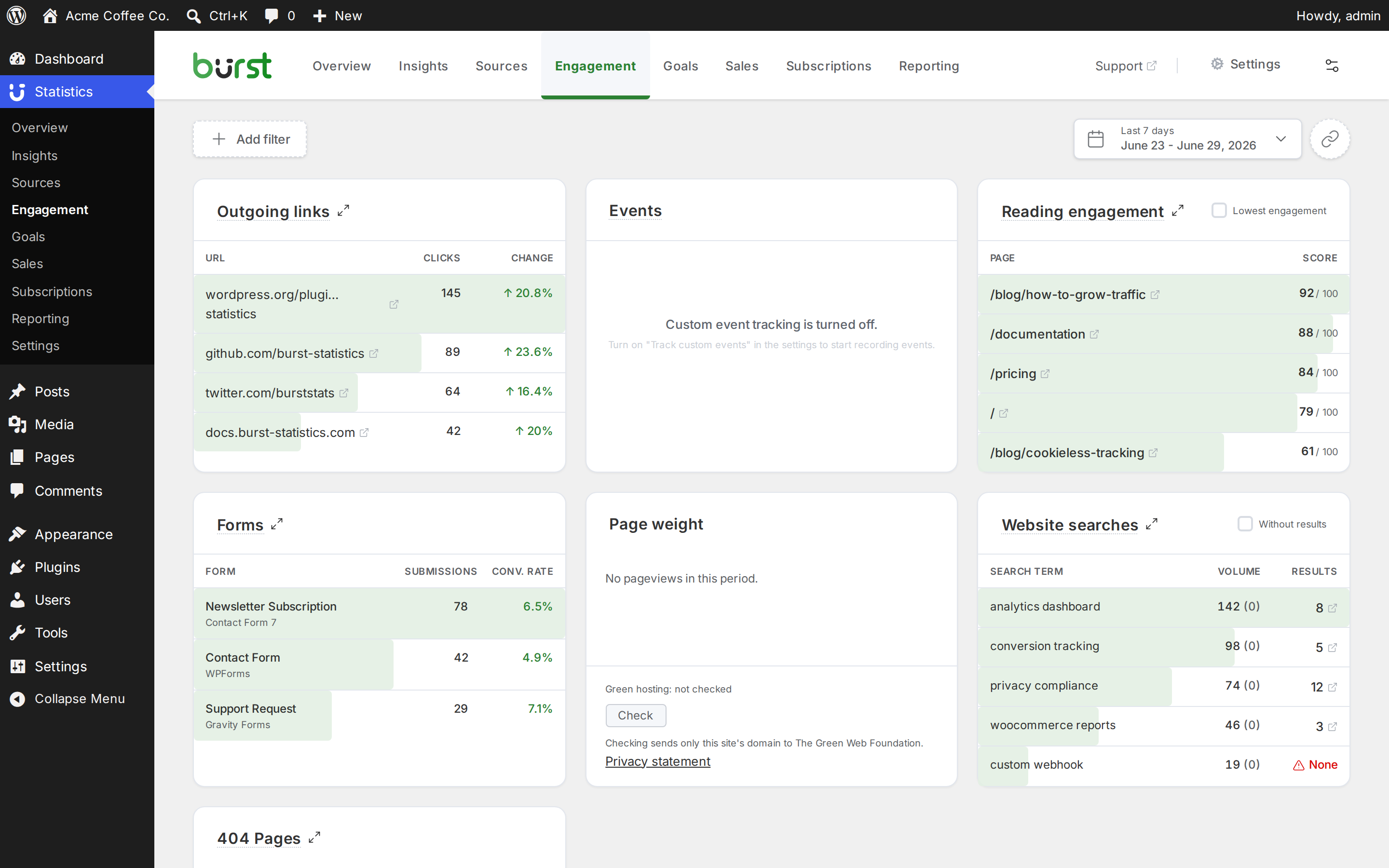
    Use the Engagement page as a to-do list for your site: links that lead nowhere, searches with no results, pages people skim, forms that don’t get sent and outgoing links that do or don’t get clicked. It’s all in your WordPress dashboard.
    4.9 out of 5 stars out of 188 reviews

    Burst Statistics reading engagement with scroll depth and time on page

    404 Not Found tracking

    A 404 is the error page someone sees when a URL doesn’t exist. Burst lists the missing URLs people request most, with a hit count for each, and keeps these hits out of your regular page statistics.

    Open a URL to see which pages and outside sites link to it. If the link is on your own site, Burst takes you straight to the page editor to fix it. If another site links there, a redirect is usually the better fix.

    Included in Creator plan

    Website search tracking

    Learn what people can’t find

    The Website searches block shows what visitors type into your site’s search box, how often and how many results each term returned. Turn on Without results to see only the searches that came up empty.

    A search with no results is a direct request. Write that post, add that product or start using the word your visitors use.

    Included in Creator plan

    Automatic form tracking

    See which forms people actually send

    Burst picks up submissions from supported form plugins, like Contact Form 7, WPForms, Gravity Forms and Fluent Forms, with no code to add. Each form shows its submissions and conversion rate. Check the integrations to see if yours is covered.

    A low rate tells you where to look first: the form’s length, its placement or the page around it. It shows that fewer people send the form, not why.

    Included in Creator plan

    Reading engagement

    Find out which pages get read

    A high pageview count doesn’t mean anyone read the page. Burst gives each page a score out of 100, based on time on page, scroll depth and how long the text should take to read.

    Switch to Lowest engagement to see the pages people skim. Those are the ones to check first: try a stronger opening, a shorter text or a closer match with what visitors came for.

    Included in Free

    Outgoing link tracking

    Burst counts clicks on links to other websites and shows each URL with its clicks and the change over time. That’s useful for affiliate links, partner sites and anything you recommend.

    If one link gets most of the clicks, move it higher up or write more on that topic. A click shows interest, not what happened on the other site. Burst first scans your site for links, so data appears once that scan is done.

    Included in Creator plan

    Ready to try all features for free?

    Try all Burst Pro features for 14 days! Business & Agency features are included.

    Zero-config setup takes less than 2 minutes

    Lightweight code keeps your site fast & optimised

    Clean dashboard focused on metrics that matter

    What our WordPress users are saying

    4.9 out of 5 stars out of 188 reviews

    "Love how it’s quick to setup, use and yet powerful enough to get the stats you need."

    @dinz

    "I had Google Analytics, I installed Burst stats and it gives me the stats I need without all the overhead.

    @marxgal

    "Finally, an analytics plugin I can actually explain to clients."

    @anguskeystone

    Frequently asked questions

    Will my clients understand Burst?

    Burst is made to be understandable, not overwhelming and actually useful.

    We prioritise keeping things simple over tracking every metric possible, we focus on data that actually provides insight.

    Where does Burst store my data?

    All data collected by Burst stays on your own WordPress site. Unlike some other analytics tools, our business model doesn’t rely on monetizing your data.

    Does Burst slow down my website?

    No, it does not. Even with lots of data gathered it does not slow down the pagespeed for your visitors.

    Try Burst Pro free for 14 days

    Every Pro feature is on during the trial, so you see your own sales, funnels and form conversions before you pay.

    Not for you? Get your money back within 30 days.